
Get started
Newton is your single source of truth for legal entities. This page gives you a quick overview of the main data points and how they relate to each other.
How your data is connected
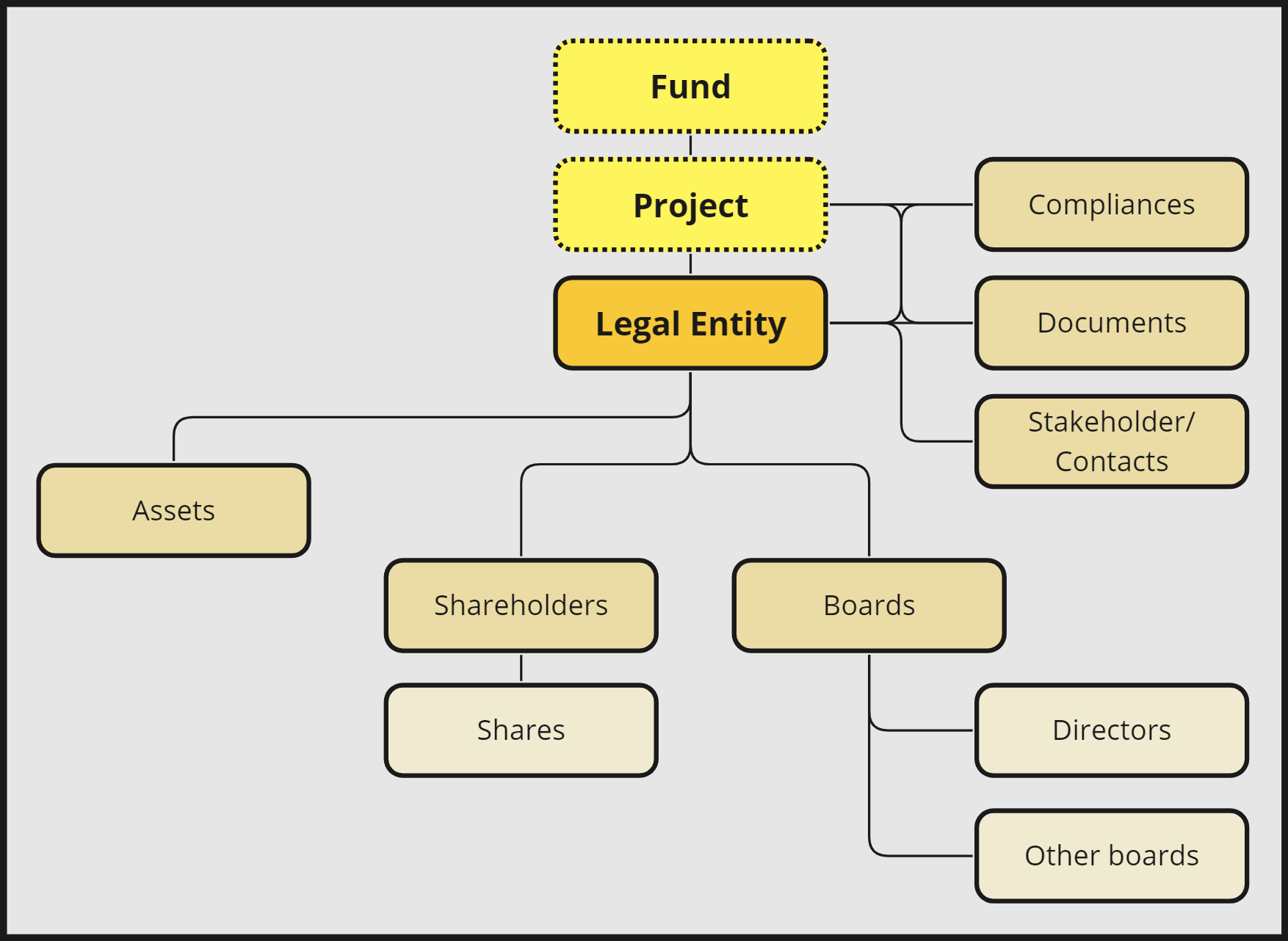
- Fund and Project group several legal entities, for example by business area or investment structure.
- Legal Entity is the centre of everything in Newton.
- Each entity holds its Compliances, Documents and Stakeholders / Contacts.
- Assets and other related records are linked directly to the entity.
Once you understand this structure, the How-to-start guide walks you through setting up Newton step by step.
Next step
How to Start with Newton
Set up your first projects, entities and contacts step by step.
In this section
01
How to Start with Newton
Basic data structure How to start? Entities are the most central elements of Newton. Before creating your…
02
Legal Entities
Create a new Legal Entity Basics Start by heading to the Entities index. Given the appropriate rights you can…
03
Projects: Create a structure of entities
Overview Creating Projects enables you to group legal entities to create overviews, such as geographical or…
04
Smart Data Import
Overview Besides adding individual projects, entities, or assets in the appropriate areas of the software,…
05
Contacts (Stakeholders)
General Within contacts, Newton distinguishes between individuals and organisations. Both can be linked…